

Bid Center
Post the project, find the bidders. Or find the work.
GCs publish the lead they’re estimating and pick who can ask to bid. Subs find projects that fit their trade and area, with the reasons. Everyone tracks every bid on one pipeline, from watching to won.
For: GCs, owners and subs · Bids priced on: Your existing bid links
- 1Publish the lead you’re estimating
- 2Decide who can ask, and what they see
- 3Your trade partners hear first
- 4Approve a request, they’re invited
For general contractors
Get more of the right subs on your bid
- 1Publish the lead you’re estimatingOne click from the lead’s Bids step. The drawings come from the lead’s plans and the bid date from its estimate, and both stay in step as you change them.
- 2Decide who can ask, and what they seeAnyone, any verified company, companies with strong Street Cred, or your trade partners only. Owner name and budget show only if you say so.
- 3Your trade partners hear firstAutomaticThe subs in your Directory get a 48-hour head start before anyone else sees the project.
- 4Approve a request, they’re invitedAutomaticApproving adds the company to your Directory and invites them to the packages in their trade. They price on the same bid link your subs already use.
For subcontractors
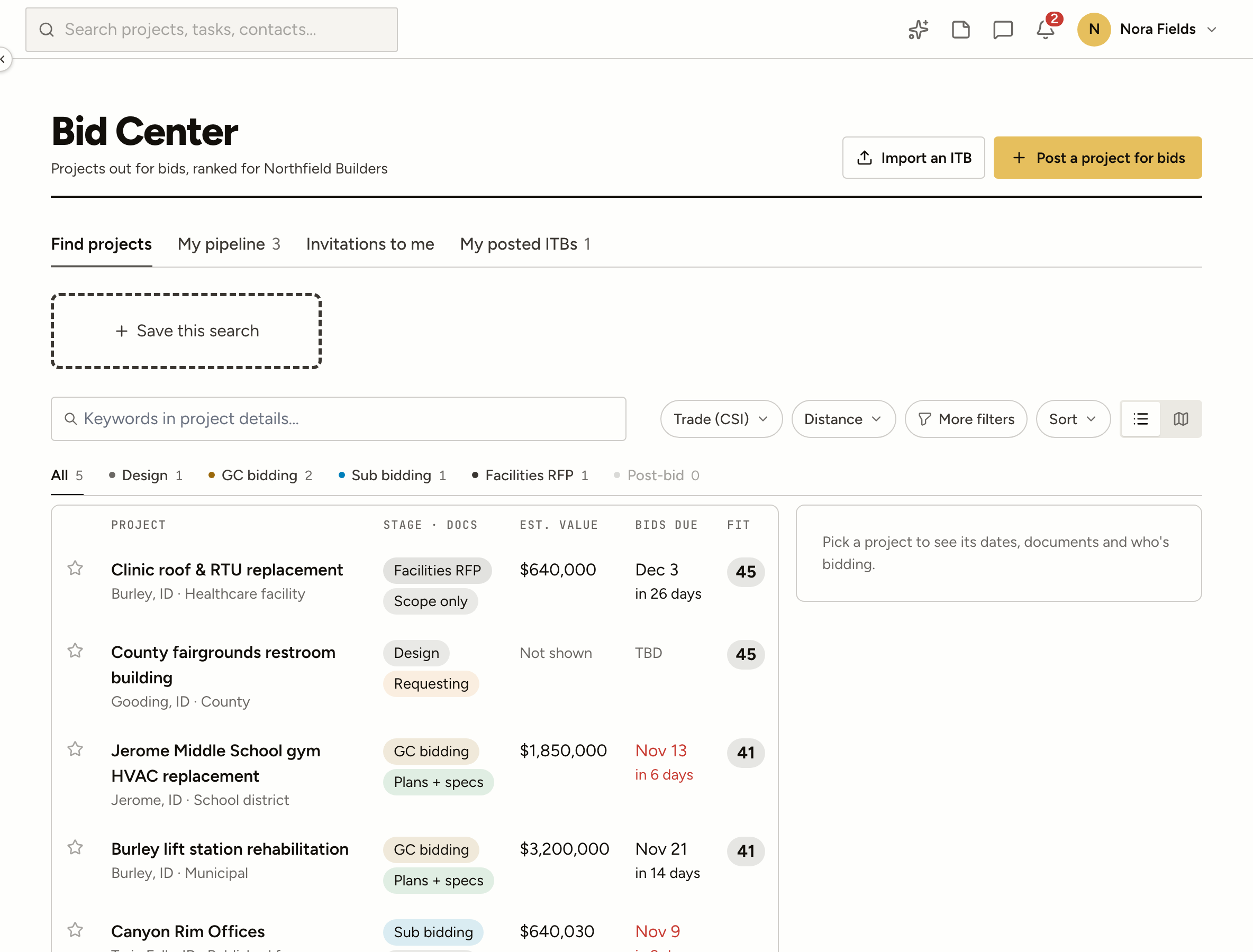
Find work that fits
- Fit, with the reasonsEach project gets a fit score from your trade, how far it is from where you work, jobs like it you’ve done, its size and owner type. The reasons are written out.
- Saved searchesKeep the filters you use, see what’s new since you looked, and get one note a day when something matches.
- Invitations in one placeBid invitations from other ProjectAire companies to yours, together, priced on their links as always.
- Import an invitation to bidDrop in the PDF or paste the email and it becomes a draft listing to check, not a retyping job.
- Read the plans for youAsk for a scope summary from the project’s documents, kept on your pipeline card.
- A map by fitEvery open project on the map, coloured by how well it fits you.
My pipeline
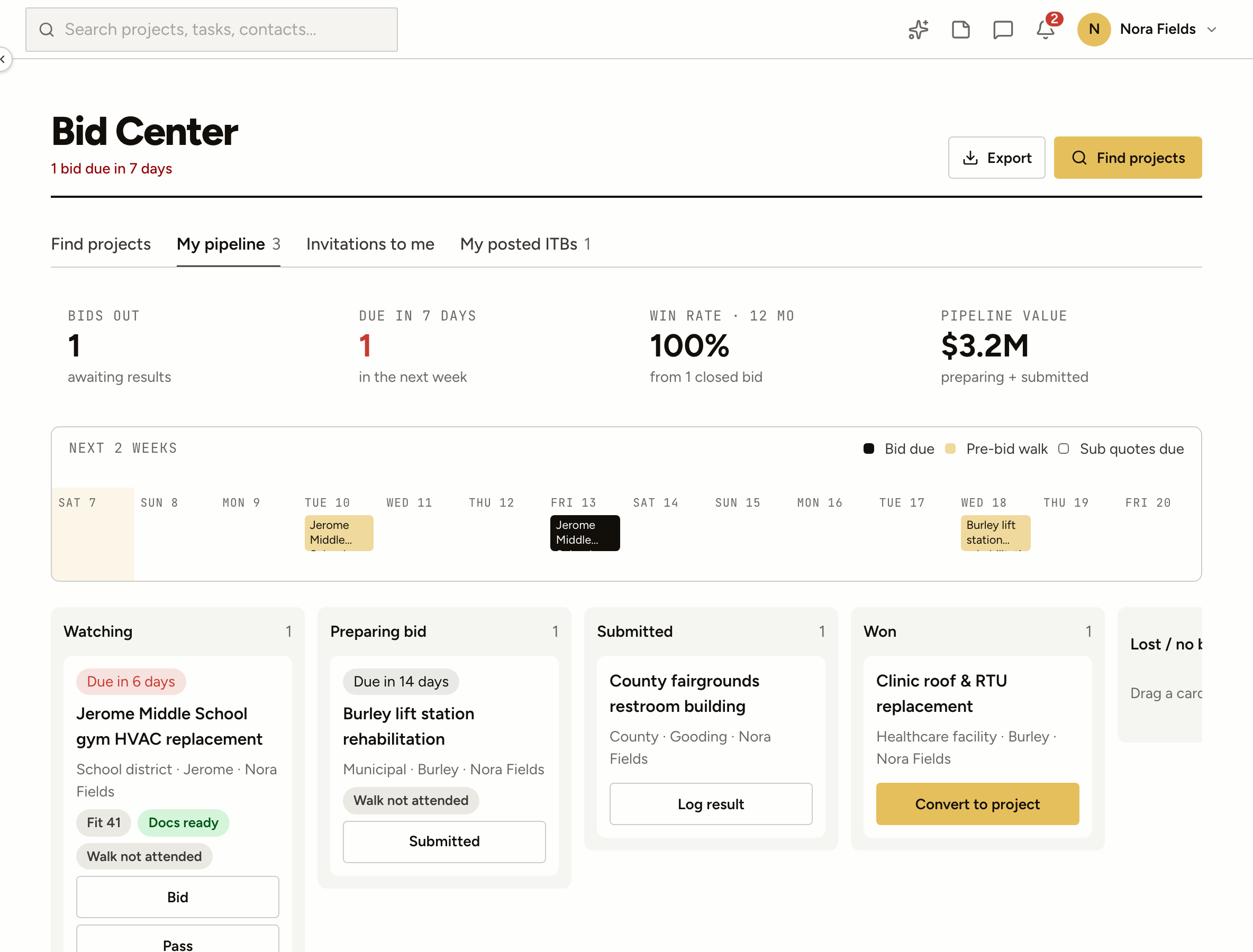
Every bid you’re chasing, on one board
Watching, preparing, submitted, won or lost. Each card shows the bid date, your sub coverage and what changed, and a phone shows one column at a time.
- Drag between columns, or move from a menu on a phone
- Sub coverage from the bids that came in
- Export the pipeline to a spreadsheet
From watching to a live job
- Watching → Preparing → SubmittedDrag a card along as the bid moves, then log it as won, lost or no bid.
- Bid makes a leadStart your bid and the listing becomes one of your leads, so estimating and inviting subs happen where they always do.
- Results you keepLog your number, where you placed and how far over the low bid, with the bid tabs.
- Won turns into a projectConvert a won bid into a live job without retyping it.
- Due dates on a calendarThe next two weeks of bid dates at a glance, and a note 48 hours before one is due.
- Addenda you won’t missChanges to a listing you’re bidding reach you, and the new date lands on your estimate.
Questions we get asked
Who can post a project?
An admin at a company on ProjectAire. General contractors publish a lead they’re estimating; owners and developers can post a project for bids straight from Community.
Do I have to show the owner or the budget?
No. Both stay hidden unless you choose to show them. Who else is bidding is only shown to companies that have the project on their pipeline.
How does a sub get invited?
They ask to bid, and you approve (or turn on auto-approve). Approving adds them to your Directory and invites them to the bid packages in their trade.
What is the fit score?
A number from 0 to 100 built from the sub’s trade, distance, similar past jobs, owner type and project size, with the reasons shown. The wrong trade caps it low.
Is Bid Center free?
Finding projects, asking to bid and the pipeline come with Community. Publishing a lead from ProjectAire Estimating is part of your company’s plan.